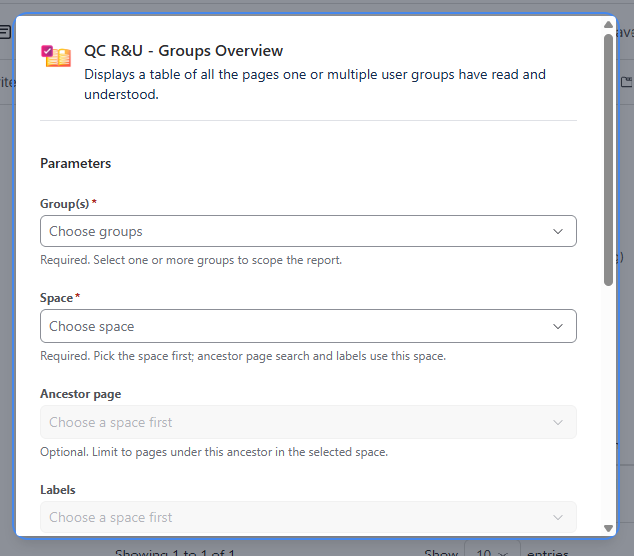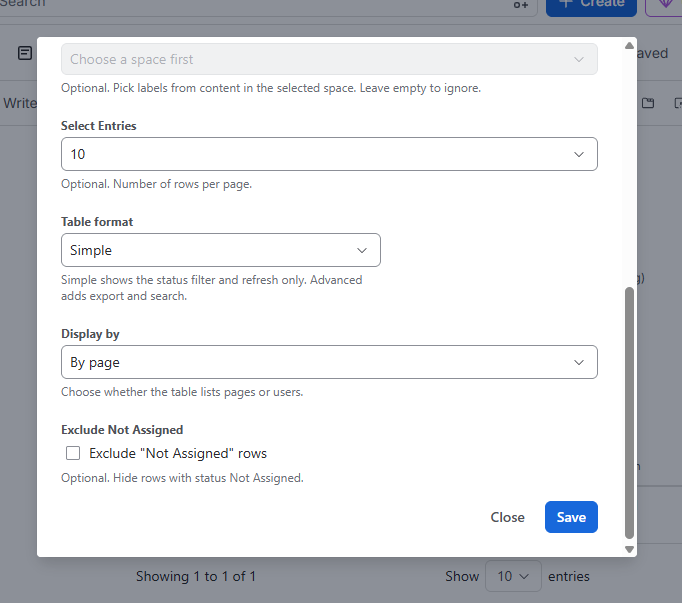
Configuration
|
Field |
Meaning |
|---|---|
|
User Group(s) |
Select which Groups to include. |
|
Space |
Required. Select in which space to search for the groups R&U. |
|
Ancestor Page / Label |
Optional. Narrow down to pages under the selected ancestor or with the specified label. |
|
Display by |
Page list vs User list. |
|
Table format |
Simple or Advanced. |
|
Exclude "Not Assigned" |
Optional. Hides not-assigned rows. |
Example: Training records
The full program (roles, labels, induction, audit export) is https://support.qc-analytics.com/qc-read-and-understood-for-confluence-cloud/keep-training-records. A short version:
-
Create a Confluence group for the trainees and give it View on the training space.
-
On each training page, add that group and Sync Groups.
-
Create a dashboard page and insert Groups Overview for that group.
-
Use labels on training pages if you want a cleaner table.
Pending items are easier to chase in Page Overview than in this macro, depending on how you configured Exclude "Not Assigned" and status filters.